gtbuy Commuter Crossbody Bag Spreadsheet Guide
gtbuy Commuter Crossbody Bag Spreadsheet Guide
The most common problem with commuter bags isn't "not enough styles" — it's buying one and only then realizing your phone doesn't fit, the strap digs into your shoulder, the closure is awkward, or the internal organization isn't what the product description claimed. This guide addresses one specific task: using the gtbuy Spreadsheet to build a candidate list and eliminate crossbody bags whose size, strap, closure, or pocket layout aren't suitable for daily commuting before you order.
After reading, you should be able to narrow down to two to four candidates worth double-checking, and know what information to confirm with the seller or platform. This guide is not for people who need to carry a laptop, professional photography gear, large water bottles, or baby supplies, and it cannot replace checks on materials, branded items, and import restrictions in the destination country.
As of August 27, 2026, gt-buy.net provides product categories, keyword search, and image search entry points, and lists Luggage & Bags as a product category. The purchase path shown on the site includes viewing product information, submitting an order, waiting for the item to arrive at the China warehouse, viewing QC photos, and arranging international shipping. Prices, stock, specifications, seller information, fees, and routes for specific products may change, and you should rely on the checkout page, warehouse page, and the records visible at that time.
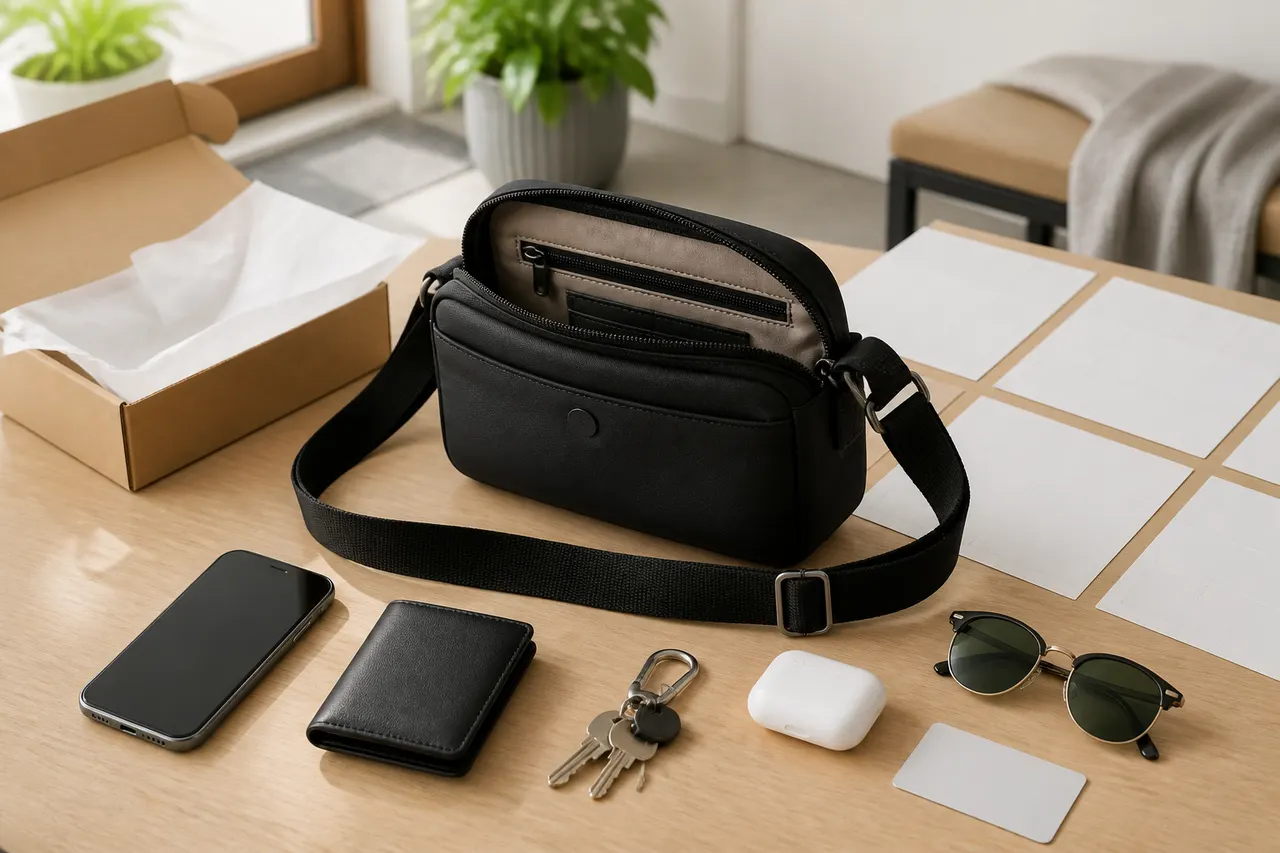
Illustration: First record your everyday carry items, then narrow down candidates step by step by size, strap, closure, and QC-verifiable items.
Start by Listing What You Must Carry Every Day
Don't filter by color or brand first. Lay out the items you actually take with you every day on a flat surface, and split them into "must fit inside the bag" and "can go in a pocket or be carried separately." A typical commuter bag list might include:
Phone, including its case and camera bump
Card holder, slim wallet, or key pouch
Keys, plus any bulky access fobs
Earbuds case, charging cable, and a small power bank
Tissues, hand sanitizer, or daily medication
Items like a glasses case or folding umbrella that you only sometimes carry
Measure the longest, widest, and thickest items, paying special attention to phone cases, keychains, and glasses cases. The external dimensions listed for a bag are not the same as the usable internal space; zipper tracks, lining, rounded corners, and dividers all take up room. It's wise to allow about 1–2 cm of clearance for the longest item when taking it in and out, but that's just a screening buffer, not a guarantee of capacity for any specific bag. 📏
If what you carry changes from day to day, create two lists: a "minimum loadout" and a "full loadout." A candidate bag must at least meet the minimum loadout; only count full-load capacity as a bonus if the bag doesn't bulge noticeably or have trouble closing.
Use the Spreadsheet to Filter Candidates by Size and Organization
In the gtbuy Spreadsheet, go to the bags and luggage category first, then use words that describe purpose and structure to filter, such as crossbody, shoulder bag, commuter, zip, flap, or multi-pocket. Search results are only a starting point; don't treat feature words in the title as verified facts.
Create a row for each candidate, recording at least the product name, listed dimensions, organization description, closure type, strap information, current displayed price, stock status, verification date, and questions to confirm. Don't just save images, because images may not reflect scale and won't help you notice missing dimensions.
Filter field | Minimum record requirement | What to do if it can't be confirmed |
|---|---|---|
Bag dimensions | Length, width, height, and units | Mark "dimensions missing"; don't estimate from photos |
Main compartment | Number, opening width, whether lined | Mark "layout unverified" |
External pockets | Position, opening type, visible depth | Don't mistake decorative stitching for pockets |
Strap | Width, adjustable range, attachment method | Mark "strap data missing" |
Closure | Zipper, flap, magnetic snap, or combination | Cross-check with detail photos and QC photos |
Time-sensitive info | Price, stock, specs, and verification date | Reopen the product page before ordering |
The first pass should only eliminate obviously unsuitable candidates. For example, if your largest item is already close to the bag's external dimensions, if the product page has no dimensions at all, or if the main compartment opening is clearly compressed by a flap or decorative structure, those should go to low priority rather than being kept because "it looks like it might fit." 🔎
Choose Strap Width and Adjustment for Your Commute
Walking and public transit commutes usually need a more stable, close-to-body fit. The strap should be adjustable to a crossbody position, and the buckle shouldn't sit right on top of your shoulder. If the product page just says "adjustable" without a length range, you can't confirm it will work for different heights, bulky winter coats, or a high, close-carry style.
Bike commutes require even more attention to bag swing. A wider strap usually distributes pressure better, but comfort also depends on the weight inside, strap material, edge finishing, and shoulder contact area, so width alone isn't the whole story. If the bag has no stabilizing structure or the strap is too long, it may shift noticeably during braking and turning even if the capacity is right. 🚇
Car commutes are more about access while seated. A bag that hangs too low may get stuck against the seat side, and a thick bag may interfere with seatbelt fit. Under no circumstances should a crossbody bag or strap interfere with proper seatbelt use.
When checking the strap, record these key points:
Is there a continuous adjustment range, or only a few fixed holes?
Could the buckle press into your shoulder or snag clothing?
Is the strap attached by stitching, metal hooks, or a detachable system?
Are the attachment points at stress-bearing parts of the bag?
Do the product images show both the shortest and longest states?
Compare Access Differences: Zipper, Flap, and Magnetic Closure
Zippers are good for commutes where you want to reduce the chance of items slipping out, but the opening width may be less than the bag's width. Check for two-way or one-way zippers, whether the zipper ends leave a noticeable gap, and whether the pull is likely to snag on curved parts of the bag.
A flap covers the main opening but adds a step to access. For people who frequently swipe a transit card, make sure the card can go in a separate outside pocket so you don't have to lift the main flap every time. If the flap coverage is insufficient, you can't judge protection just by "has a flap."
Magnetic closures are usually quick to open, but the holding strength depends on magnet position, how full the bag is, and the structure. The term "strong magnet" in a product title is a functional claim that needs verification; static images can't prove pull strength. Users with payment cards, access cards, or medical devices should also check the manufacturer's safety guidance to decide whether to avoid magnetic structures.
Combined closures, like a flap plus zipper, may add protection but can also slow down frequent access. The choice should be based on your daily sequence of actions: put your transit card, keys, and earbuds in easy-reach but secure spots, and put your wallet and documents in a fully closable main compartment. 👜
Check Materials, Weight, and Pocket Layout from the Listing
Material names must be taken from the current product page text. Photos alone cannot tell you whether something is genuine leather, synthetic leather, nylon, or another textile, nor can gloss tell you about durability, water resistance, or feel. When you see descriptions like "waterproof," "ultralight," or "scratch-resistant," write down the exact wording and any stated conditions; if there's no test standard or weight data, list it as an item to confirm.
Weight should be recorded as a number with units. If the page doesn't list weight, don't write "lightweight" as if it were data. Final international shipping costs may also be affected by packaging, consolidation method, route billing rules, and volumetric weight, so the product weight of a single bag is not the same as the shipping chargeable weight.
When checking pocket layout, match each visible opening to the description item by item:
Can the main compartment open fully?
Does the internal zipper pocket have real depth?
Can the slip pocket hold a phone with a case?
Is the outside pocket blocked by the flap, decorative straps, or hardware?
Will hard items like keys share the same space as your phone screen?
If the product page shows different colors or versions, dimensions, lining, and hardware information cannot be automatically interchanged. Confirm that the selected specification matches the images you are viewing.
Use QC Photos to Check Strap Attachment, Stitching, and Symmetry
After the item arrives at the gtbuy China warehouse, compare the QC photos for that order with the information you saved when ordering. QC photos help check visible appearance, but they cannot prove long-term durability, true material composition, water resistance, magnetic strength, or carrying comfort.
Follow a fixed order to avoid missing anything:
Front and back: Check whether the bag's center line, flap edge, and pocket position are noticeably skewed.
Left and right sides: Compare thickness, side panel shape, and strap attachment point height.
Bottom: Check bottom corners, binding, and obvious dents.
Closure area: Look at the zipper track, pulls, magnetic snaps, or snaps.
Strap attachment points: Zoom in to check stitching, rivets, hooks, and stress areas.
Interior: Confirm the number of compartments, lining condition, and pocket layout match the selected specification.
If the photo angle is not enough to judge a key issue, ask within the platform's allowed scope whether they can provide additional angles or measurements, and note any time limits or fees. Don't immediately call blur, shadows, or lens perspective a defect; likewise, don't ignore the sides and attachment points just because one front photo looks neat. 📷
Mark Missing Dimensions and Unverifiable Feature Claims
Your candidate list should clearly distinguish three states: supported by current page data, checkable via QC photos, and not verifiable at this stage. This prevents mixing sales points, speculation, and evidence.
When dimensions, strap length, or weight are missing, write "missing"; don't fill in data from a similar model. For descriptions like "waterproof," "anti-theft," "ergonomic," "high load-bearing," or "wear-resistant," if there are no stated conditions, structural details, or verifiable references, write "feature claim unverified."
Raise the risk level in these situations:
The product name, images, and selected specification don't match
Different images show different pocket or strap structures
Dimensions lack units, or the order of length, width, and height is unclear
Only promotional renders exist, with no detail photos to judge structure
Price or stock changed but you didn't record a new date
QC photos can't be matched to a specific specification or order
Brand, logo, and visual similarity also need separate verification. The platform's inclusion or search result containing a name does not guarantee authenticity, authorized status, or importability in the destination country. If you have doubts about source, intellectual property, or import compliance, don't proceed just because of a low price.
Build Your Final Candidate List and Do a Pre-Order Review
For the final list, I recommend keeping only two to four candidates. For each candidate, write down one reason to keep it, one major risk, and one question that still needs confirmation. Before ordering, reopen the product page and complete this review:
Is the current specification, color, size, and quantity correct?
Do the displayed price, stock, and seller information still match your records?
Is your largest everyday item smaller than a reasonably usable opening and internal space?
Does the strap adjustment structure fit your commute style and clothing thickness?
Does the closure type meet your needs for frequent access and preventing drops?
Is there clear evidence for material, weight, and pocket layout?
Have you checked warehouse QC, return/exchange handling, and relevant deadlines?
Have domestic fees, international shipping costs, payment fees, and destination taxes been included in your budget?
Have you checked import requirements for materials, brands, and related items in the destination country?
Do not under-declare value, misdescribe the item, or rely on splitting packages to avoid taxes. Declarations, duties, documentation, and import restrictions should follow the current requirements of the destination country's customs and the carrier's route.
The money this method saves is not a fixed discount, but the estimated total cost of candidates you eliminate early. You can calculate the potential loss from each unsuitable candidate as "product price + domestic fees + estimated international shipping + non-refundable fees," and recalculate before checkout using the current currency and fees. The cost it adds is screening time, and the risk of stock changes while waiting for supplementary information.
This method is suitable for commuters whose everyday items are relatively fixed and who are willing to keep size and verification records; it is not recommended for people who rush to order, cannot get key dimensions, need special load-bearing capacity, or treat product images as proof of function. If core dimensions, strap attachment, or closure structure cannot be confirmed, giving up that candidate is usually safer than dealing with an unsuitable bag later.
Content and verification note: This article was generated by an automated editorial process based on information accessible on gt-buy.net as of August 27, 2026, and commuter bag screening methods, with independent checks on factual boundaries, feature descriptions, brand risks, and image use; it does not claim real purchase, wear, receipt, or testing of any specific product. Prices, stock, fees, policies, and link status are time-sensitive, and users should re-verify before ordering and shipping.
Agent Platform Shopping FAQ
1. Why doesn't gt-buy.net use Google Sheets to display products?
Google Sheets is only suitable for small product tables. As product entries increase, loading becomes very slow and the system lags noticeably, especially on mobile, making product search inconvenient. In contrast, gt-buy.net's spreadsheet offers better loading speed and visual experience, displaying quickly even with a large number of products.
2. What kinds of products can be browsed in the gt-buy.net spreadsheet?
The gt-buy.net spreadsheet includes shoes, clothing, bags, accessories, jerseys, perfumes, hats, scarves, belts, and various household items.
3. Is the gt-buy.net spreadsheet website safe and reliable?
gt-buy.net does not collect any personal information; it only serves as a product catalog for the agent platform. All transactions are completed on the agent platform.
4. What product types are offered on the gt-buy.net website?
gt-buy.net offers a rich range of product categories, including shoes, T-shirts, sweaters, hoodies, jeans, sweatpants, shorts, board shorts, factory clearance items, down jackets, baseball jerseys, shirts, hats, jewelry, bags, electronics, sunglasses, socks, underwear, and trendy collectibles.
Browse our latest products and find your next favorite item.